In This Tutorial
1 API Overview
The CLAUDIUS HTTP API provides low-latency control over Unreal Engine. While the file-based method is great for Claude Code integration, the HTTP API offers:
- Lower latency: ~10-50ms vs ~500ms for file polling
- Synchronous responses: Get results immediately in the same request
- Better for scripting: Ideal for Python, Node.js, or any HTTP client
- Chained operations: Use response data in subsequent commands
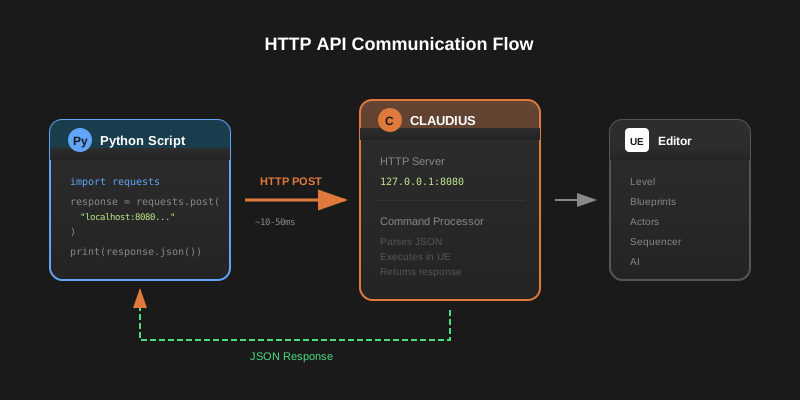
The API runs on http://127.0.0.1:8080 by default. This is localhost-only for security—CLAUDIUS doesn't expose your editor to the network.
Request Format
All commands use the same JSON format as file-based communication:
{
  "command_id": "unique_identifier",
  "category": "level|editor|console|...",
  "command": "command_name",
  "params": {
    // Command-specific parameters
  }
}
2 API Endpoints
Execute a single CLAUDIUS command. Returns the result synchronously.
# List all actors in the level
curl -X POST http://127.0.0.1:8080/api/v1/commands \
  -H "Content-Type: application/json" \
  -d '{
    "command_id": "list_001",
    "category": "level",
    "command": "list_actors",
    "params": {}
  }'
Check if CLAUDIUS is running and get server information.
{
  "status": "running",
  "version": "1.0.0",
  "unreal_version": "5.7",
  "project_name": "MyProject",
  "uptime_seconds": 3842
}
Execute multiple commands in a single request. Commands run sequentially.
{
  "commands": [
    {
      "command_id": "spawn_1",
      "category": "level",
      "command": "spawn_actor",
      "params": { "class_path": "/Script/Engine.PointLight" }
    },
    {
      "command_id": "screenshot_1",
      "category": "viewport",
      "command": "take_screenshot",
      "params": {}
    }
  ]
}
3 Python Basics
Let's build a simple Python client for CLAUDIUS. We'll use the requests library.
Installation
pip install requests
Basic Client Class
import requests
import uuid
from typing import Dict, Any, Optional

class ClaudiusClient:
    """Simple Python client for CLAUDIUS HTTP API"""

    def __init__(self, host: str = "127.0.0.1", port: int = 8080):
        self.base_url = f"http://{host}:{port}"
        self.session = requests.Session()
        self.session.headers.update({
            "Content-Type": "application/json"
        })

    def execute(
        self,
        category: str,
        command: str,
        params: Optional[Dict[str, Any]] = None,
        command_id: Optional[str] = None
    ) -> Dict[str, Any]:
        """Execute a single command and return the response"""

        payload = {
            "command_id": command_id or str(uuid.uuid4()),
            "category": category,
            "command": command,
            "params": params or {}
        }

        response = self.session.post(
            f"{self.base_url}/api/v1/commands",
            json=payload
        )
        response.raise_for_status()
        return response.json()

    def status(self) -> Dict[str, Any]:
        """Check CLAUDIUS server status"""
        response = self.session.get(f"{self.base_url}/api/v1/status")
        response.raise_for_status()
        return response.json()

    def is_connected(self) -> bool:
        """Check if we can connect to CLAUDIUS"""
        try:
            self.status()
            return True
        except:
            return False
Using the Client
from claudius_client import ClaudiusClient

# Initialize client
client = ClaudiusClient()

# Check connection
if not client.is_connected():
    print("Cannot connect to CLAUDIUS. Is Unreal running?")
    exit(1)

# List actors
result = client.execute("level", "list_actors")
print(f"Found {result['output']['count']} actors")

# Spawn a point light
result = client.execute(
    category="level",
    command="spawn_actor",
    params={
        "class_path": "/Script/Engine.PointLight",
        "location": {"x": 0, "y": 0, "z": 300},
        "actor_label": "MyLight"
    }
)

if result["success"]:
    print(f"Spawned: {result['output']['actor_name']}")
else:
    print(f"Error: {result['message']}")
4 Error Handling
Robust scripts need proper error handling. CLAUDIUS can fail for several reasons:
- Connection errors: Unreal Editor not running, wrong port
- Command errors: Invalid parameters, missing actors
- Timeouts: Long operations like builds or renders
import requests
from requests.exceptions import ConnectionError, Timeout
import time

class ClaudiusError(Exception):
    """Base exception for CLAUDIUS errors"""
    pass

class CommandError(ClaudiusError):
    """Raised when a command fails"""
    def __init__(self, message: str, response: dict):
        super().__init__(message)
        self.response = response

class RobustClaudiusClient:
    def __init__(self, host="127.0.0.1", port=8080, timeout=30):
        self.base_url = f"http://{host}:{port}"
        self.timeout = timeout
        self.session = requests.Session()

    def execute(self, category, command, params=None, retries=3):
        """Execute with retry logic and proper error handling"""

        for attempt in range(retries):
            try:
                response = self.session.post(
                    f"{self.base_url}/api/v1/commands",
                    json={
                        "command_id": f"{command}_{time.time()}",
                        "category": category,
                        "command": command,
                        "params": params or {}
                    },
                    timeout=self.timeout
                )

                result = response.json()

                # Check for command-level errors
                if not result.get("success", False):
                    raise CommandError(
                        result.get("message", "Unknown error"),
                        result
                    )

                return result

            except ConnectionError:
                if attempt == retries - 1:
                    raise ClaudiusError(
                        "Cannot connect to CLAUDIUS. Is Unreal Editor running?"
                    )
                time.sleep(1)  # Wait before retry

            except Timeout:
                raise ClaudiusError(
                    f"Command timed out after {self.timeout}s"
                )
Some operations like build_lighting or render_sequence can take minutes. Increase the timeout for these commands or use asynchronous patterns.
5 Advanced Patterns
Async Operations with asyncio
For scripts that need to run many commands or monitor progress, use async:
import asyncio
import aiohttp

class AsyncClaudiusClient:
    def __init__(self, host="127.0.0.1", port=8080):
        self.base_url = f"http://{host}:{port}"

    async def execute(self, session, category, command, params=None):
        async with session.post(
            f"{self.base_url}/api/v1/commands",
            json={
                "category": category,
                "command": command,
                "params": params or {}
            }
        ) as response:
            return await response.json()

async def spawn_grid(count: int = 10):
    """Spawn a grid of lights asynchronously"""
    client = AsyncClaudiusClient()

    async with aiohttp.ClientSession() as session:
        tasks = []
        for x in range(count):
            for y in range(count):
                task = client.execute(
                    session,
                    "level",
                    "spawn_actor",
                    {
                        "class_path": "/Script/Engine.PointLight",
                        "location": {"x": x * 200, "y": y * 200, "z": 100}
                    }
                )
                tasks.append(task)

        results = await asyncio.gather(*tasks)
        print(f"Spawned {len(results)} lights")

# Run it
asyncio.run(spawn_grid(5))  # Creates 25 lights in a 5x5 grid
Command Chaining
Use response data to drive subsequent commands:
def select_and_transform_all_lights(client, offset_z=100):
    """Find all lights and move them up"""

    # First, list all actors
    result = client.execute("level", "list_actors")

    # Filter for lights
    lights = [
        actor for actor in result["output"]["actors"]
        if "Light" in actor["class"]
    ]

    print(f"Found {len(lights)} lights")

    # Move each light up
    for light in lights:
        # Get current transform
        transform = client.execute(
            "level",
            "get_actor_transform",
            {"actor_name": light["name"]}
        )

        # Calculate new position
        current_z = transform["output"]["location"]["z"]

        # Set new transform
        client.execute(
            "level",
            "set_actor_transform",
            {
                "actor_name": light["name"],
                "location": {
                    "z": current_z + offset_z
                }
            }
        )

    print(f"Moved {len(lights)} lights up by {offset_z} units")
6 Complete Examples
Level Generator Script
Here's a complete script that generates a simple level programmatically:
from claudius_client import ClaudiusClient
import random

def generate_test_level():
    """Generate a test level with floor, lights, and objects"""

    client = ClaudiusClient()

    if not client.is_connected():
        print("CLAUDIUS not available")
        return

    print("Generating test level...")

    # 1. Create floor
    client.execute("level", "spawn_actor", {
        "class_path": "/Engine/BasicShapes/Plane.Plane",
        "location": {"x": 0, "y": 0, "z": 0},
        "scale": {"x": 20, "y": 20, "z": 1},
        "actor_label": "Floor"
    })
    print("  Created floor")

    # 2. Add lighting
    client.execute("level", "spawn_actor", {
        "class_path": "/Script/Engine.DirectionalLight",
        "rotation": {"pitch": -45, "yaw": 0},
        "actor_label": "SunLight"
    })

    client.execute("level", "spawn_actor", {
        "class_path": "/Script/Engine.SkyLight",
        "actor_label": "AmbientLight"
    })
    print("  Added lighting")

    # 3. Scatter random cubes
    for i in range(20):
        x = random.uniform(-1000, 1000)
        y = random.uniform(-1000, 1000)
        scale = random.uniform(0.5, 2.0)

        client.execute("level", "spawn_actor", {
            "class_path": "/Engine/BasicShapes/Cube.Cube",
            "location": {"x": x, "y": y, "z": 50 * scale},
            "scale": {"x": scale, "y": scale, "z": scale},
            "actor_label": f"Cube_{i}"
        })
    print("  Scattered 20 cubes")

    # 4. Add 4 point lights at corners
    corners = [
        (800, 800), (-800, 800),
        (-800, -800), (800, -800)
    ]
    for i, (x, y) in enumerate(corners):
        client.execute("level", "spawn_actor", {
            "class_path": "/Script/Engine.PointLight",
            "location": {"x": x, "y": y, "z": 400},
            "actor_label": f"CornerLight_{i}"
        })
    print("  Added corner lights")

    # 5. Take a screenshot
    result = client.execute("viewport", "take_screenshot", {
        "filename": "generated_level.png"
    })
    print(f"  Screenshot: {result['output']['path']}")

    print("Level generation complete!")

if __name__ == "__main__":
    generate_test_level()
Now that you understand the HTTP API, check out the Automated Video Pipeline tutorial to learn how to render cinematics programmatically.