In This Tutorial
1 Pipeline Overview
An automated video pipeline allows you to generate cinematic content programmatically. This is useful for:
- Content creation: Generate multiple video variations from scripts
- AI-driven cinematics: Let LLMs write scene descriptions, then render them
- Batch rendering: Queue up multiple sequences for overnight rendering
- Procedural trailers: Auto-generate marketing content
This tutorial assumes you've completed the HTTP API Deep Dive tutorial. We'll be building on those Python patterns.
2 Sequencer Commands
CLAUDIUS provides comprehensive Sequencer control. Here are the key commands:
Creating a Sequence
{
  "command_id": "create_seq",
  "category": "sequencer",
  "command": "create_sequence",
  "params": {
    "sequence_name": "MyScene",
    "path": "/Game/Cinematics",
    "frame_rate": 30,
    "duration_seconds": 10
  }
}

// Response:
{
  "success": true,
  "output": {
    "sequence_path": "/Game/Cinematics/MyScene",
    "frame_count": 300
  }
}
Adding Tracks
// Add an actor to the sequence
{
  "category": "sequencer",
  "command": "add_actor_track",
  "params": {
    "sequence_path": "/Game/Cinematics/MyScene",
    "actor_name": "MainCamera"
  }
}
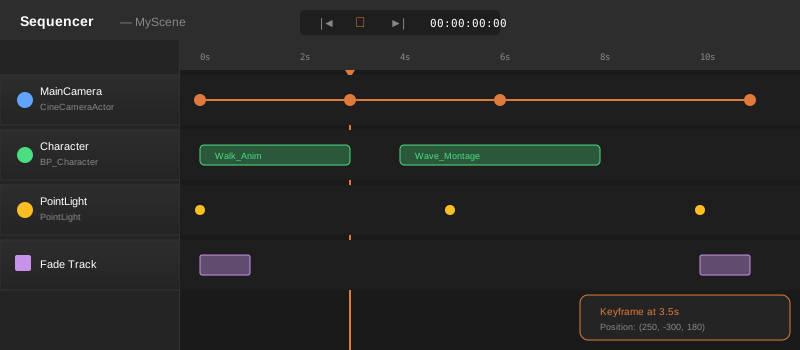
Adding Keyframes
// Add a transform keyframe at frame 0
{
  "category": "sequencer",
  "command": "add_keyframe",
  "params": {
    "sequence_path": "/Game/Cinematics/MyScene",
    "actor_name": "MainCamera",
    "track_type": "transform",
    "frame": 0,
    "location": { "x": 0, "y": -500, "z": 200 },
    "rotation": { "pitch": -10, "yaw": 0, "roll": 0 }
  }
}
3 Camera Control
For cinematic cameras, use CineCameraActor which provides film-like settings:
def create_cinematic_camera(client, name, position, look_at):
    """Create a CineCamera looking at a target"""

    # Calculate rotation to look at target
    import math
    dx = look_at["x"] - position["x"]
    dy = look_at["y"] - position["y"]
    dz = look_at["z"] - position["z"]

    yaw = math.degrees(math.atan2(dy, dx))
    pitch = math.degrees(math.atan2(dz, math.sqrt(dx*dx + dy*dy)))

    # Spawn camera
    result = client.execute("level", "spawn_actor", {
        "class_path": "/Script/CinematicCamera.CineCameraActor",
        "location": position,
        "rotation": {
            "pitch": -pitch,
            "yaw": yaw,
            "roll": 0
        },
        "actor_label": name
    })

    return result["output"]["actor_name"]

# Usage
camera = create_cinematic_camera(
    client,
    "HeroShot",
    {"x": 0, "y": -800, "z": 300},
    {"x": 0, "y": 0, "z": 100}  # Look at origin
)
Camera Movement Animation
def animate_camera_orbit(client, sequence_path, camera_name, center, radius, frames):
    """Create an orbiting camera animation"""
    import math

    # Add camera to sequence
    client.execute("sequencer", "add_actor_track", {
        "sequence_path": sequence_path,
        "actor_name": camera_name
    })

    # Add keyframes around the orbit
    keyframe_count = 12
    for i in range(keyframe_count + 1):
        angle = (2 * math.pi * i) / keyframe_count
        frame = int((frames * i) / keyframe_count)

        x = center["x"] + radius * math.cos(angle)
        y = center["y"] + radius * math.sin(angle)
        z = center["z"] + 200

        # Calculate look-at rotation
        yaw = math.degrees(angle + math.pi)

        client.execute("sequencer", "add_keyframe", {
            "sequence_path": sequence_path,
            "actor_name": camera_name,
            "track_type": "transform",
            "frame": frame,
            "location": {"x": x, "y": y, "z": z},
            "rotation": {"pitch": -15, "yaw": yaw, "roll": 0}
        })
4 Actor Animation
Animate actors in the scene with transform and property keyframes:
def animate_actor_path(client, sequence_path, actor_name, waypoints):
    """Animate an actor along a path of waypoints"""

    # Add actor to sequence
    client.execute("sequencer", "add_actor_track", {
        "sequence_path": sequence_path,
        "actor_name": actor_name
    })

    # Add keyframe for each waypoint
    for waypoint in waypoints:
        client.execute("sequencer", "add_keyframe", {
            "sequence_path": sequence_path,
            "actor_name": actor_name,
            "track_type": "transform",
            "frame": waypoint["frame"],
            "location": waypoint["position"],
            "rotation": waypoint.get("rotation", {"pitch": 0, "yaw": 0, "roll": 0})
        })

# Example: Character walks across scene
waypoints = [
    {"frame": 0, "position": {"x": -500, "y": 0, "z": 0}},
    {"frame": 60, "position": {"x": 0, "y": 0, "z": 0}},
    {"frame": 120, "position": {"x": 500, "y": 0, "z": 0}},
]
animate_actor_path(client, "/Game/Cinematics/MyScene", "Character", waypoints)
Triggering Animations
// Add an animation track to play a montage
{
  "category": "sequencer",
  "command": "add_animation_track",
  "params": {
    "sequence_path": "/Game/Cinematics/MyScene",
    "actor_name": "Character",
    "animation_path": "/Game/Animations/Wave_Montage",
    "start_frame": 30
  }
}
5 Movie Render Queue
CLAUDIUS integrates with Movie Render Queue for high-quality output:
{
  "category": "sequencer",
  "command": "render_sequence",
  "params": {
    "sequence_path": "/Game/Cinematics/MyScene",
    "output_directory": "C:/Renders/MyScene",
    "output_format": "mp4",
    "resolution": {
      "width": 1920,
      "height": 1080
    },
    "quality": "cinematic",
    "anti_aliasing": "temporal"
  }
}

// Response (after render completes):
{
  "success": true,
  "execution_time_ms": 145000,
  "output": {
    "output_file": "C:/Renders/MyScene/MyScene.mp4",
    "frame_count": 300,
    "render_time_seconds": 142
  }
}
Rendering can take minutes or hours depending on sequence length and quality settings. Use a long timeout or poll for completion status.
Render Settings
Available quality presets and options:
- output_format:
png,jpg,exr,mp4,avi - quality:
preview,medium,high,cinematic - anti_aliasing:
none,fxaa,temporal - resolution: Any width/height, common presets like 1080p, 4K
6 Complete Pipeline
Here's a complete Python script that creates a cinematic from a JSON scene description:
import json
from claudius_client import ClaudiusClient

class VideoPipeline:
    def __init__(self):
        self.client = ClaudiusClient()

    def create_from_script(self, script: dict) -> str:
        """
        Create and render a video from a scene script.

        Script format:
        {
            "name": "MyVideo",
            "duration_seconds": 10,
            "cameras": [
                {"name": "Main", "position": [x,y,z], "look_at": [x,y,z]}
            ],
            "actors": [
                {"blueprint": "/Game/BP_Character", "name": "Hero", "waypoints": [...]}
            ],
            "render": {"resolution": [1920, 1080], "quality": "high"}
        }
        """

        name = script["name"]
        duration = script["duration_seconds"]
        fps = script.get("fps", 30)

        print(f"Creating cinematic: {name}")

        # 1. Create sequence
        seq_path = f"/Game/Cinematics/{name}"
        self.client.execute("sequencer", "create_sequence", {
            "sequence_name": name,
            "path": "/Game/Cinematics",
            "frame_rate": fps,
            "duration_seconds": duration
        })
        print("  Created sequence")

        # 2. Spawn and animate cameras
        for cam in script.get("cameras", []):
            pos = cam["position"]
            self._create_camera(cam["name"], pos, cam.get("look_at"))

            if "keyframes" in cam:
                self._animate_camera(seq_path, cam["name"], cam["keyframes"])
        print(f"  Added {len(script.get('cameras', []))} cameras")

        # 3. Spawn and animate actors
        for actor in script.get("actors", []):
            self._spawn_actor(actor)
            if "waypoints" in actor:
                self._animate_actor(seq_path, actor["name"], actor["waypoints"])
        print(f"  Added {len(script.get('actors', []))} actors")

        # 4. Render
        render_cfg = script.get("render", {})
        output_path = self._render(seq_path, name, render_cfg)

        print(f"  Rendered to: {output_path}")
        return output_path

    def _create_camera(self, name, position, look_at=None):
        # Camera creation logic here
        self.client.execute("level", "spawn_actor", {
            "class_path": "/Script/CinematicCamera.CineCameraActor",
            "location": {"x": position[0], "y": position[1], "z": position[2]},
            "actor_label": name
        })

    def _render(self, seq_path, name, config):
        res = config.get("resolution", [1920, 1080])
        result = self.client.execute("sequencer", "render_sequence", {
            "sequence_path": seq_path,
            "output_directory": f"C:/Renders/{name}",
            "output_format": config.get("format", "mp4"),
            "resolution": {"width": res[0], "height": res[1]},
            "quality": config.get("quality", "high")
        })
        return result["output"]["output_file"]

# Usage
pipeline = VideoPipeline()
output = pipeline.create_from_script({
    "name": "ProductShowcase",
    "duration_seconds": 15,
    "cameras": [
        {"name": "Orbit", "position": [500, 0, 200], "look_at": [0, 0, 0]}
    ],
    "render": {"resolution": [1920, 1080], "quality": "cinematic"}
})
This pipeline can be driven by an LLM. Have Claude or GPT generate the JSON scene description, then pass it to this pipeline. This enables natural language video creation!