In This Tutorial
1 AI System Overview
Unreal Engine's AI system consists of several key components that CLAUDIUS can control:
- Blackboard: Data storage for AI decisions - CLAUDIUS can read/write values
- Behavior Trees: Decision logic - CLAUDIUS can start/stop/restart trees
- AI Controllers: The brain of each NPC - CLAUDIUS can access and modify
- Navigation: Pathfinding system - CLAUDIUS can query paths and trigger moves
PIE Required
AI commands work during Play-In-Editor (PIE). The game must be running for these commands to affect AI behavior. Use the console/start_pie command to begin playback.
Starting PIE
// Start Play-In-Editor to enable AI commands
{
  "category": "console",
  "command": "start_pie",
  "params": {}
}

// Response when PIE starts:
{
  "success": true,
  "message": "PIE started successfully",
  "output": {
    "world_type": "PIE"
  }
}
2 Blackboard Commands
The Blackboard is the memory of your AI. CLAUDIUS can read and write any blackboard key:
Reading Blackboard Values
get_blackboard_value.json
{
  "category": "ai",
  "command": "get_blackboard_value",
  "params": {
    "actor_name": "BP_Enemy_C_0",
    "key_name": "TargetActor"
  }
}

// Response:
{
  "success": true,
  "output": {
    "key_name": "TargetActor",
    "value_type": "Object",
    "value": "BP_PlayerCharacter_C_0"
  }
}
Setting Blackboard Values
set_blackboard_value.json
// Set a vector (location to move to)
{
  "category": "ai",
  "command": "set_blackboard_value",
  "params": {
    "actor_name": "BP_Enemy_C_0",
    "key_name": "PatrolLocation",
    "value_type": "vector",
    "value": { "x": 500, "y": 200, "z": 0 }
  }
}

// Set a boolean (alert state)
{
  "category": "ai",
  "command": "set_blackboard_value",
  "params": {
    "actor_name": "BP_Enemy_C_0",
    "key_name": "IsAlerted",
    "value_type": "bool",
    "value": true
  }
}

// Set an object reference (target actor)
{
  "category": "ai",
  "command": "set_blackboard_value",
  "params": {
    "actor_name": "BP_Enemy_C_0",
    "key_name": "TargetActor",
    "value_type": "object",
    "value": "BP_PlayerCharacter_C_0"
  }
}
Dumping All Blackboard Values
dump_blackboard.json
{
  "category": "ai",
  "command": "dump_blackboard",
  "params": {
    "actor_name": "BP_Enemy_C_0"
  }
}

// Response:
{
  "success": true,
  "output": {
    "blackboard_asset": "BB_Enemy",
    "values": {
      "TargetActor": "BP_PlayerCharacter_C_0",
      "PatrolLocation": { "x": 500, "y": 200, "z": 0 },
      "IsAlerted": true,
      "Health": 100,
      "LastKnownLocation": { "x": 0, "y": 0, "z": 0 }
    }
  }
}
3 Behavior Tree Control
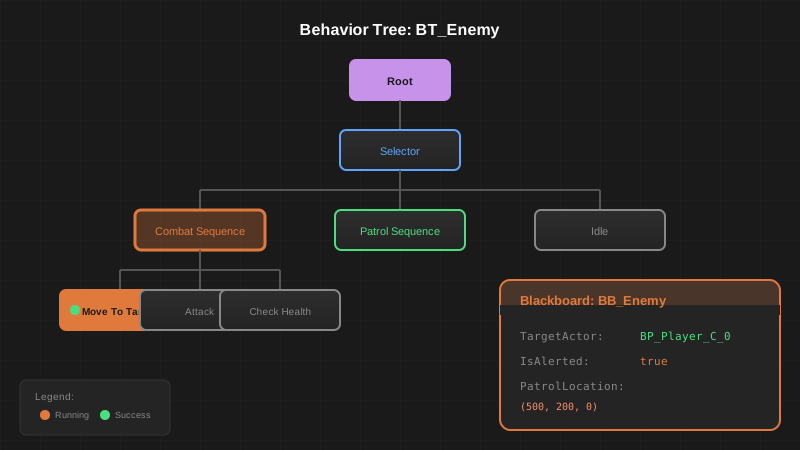
Control behavior tree execution:
behavior_tree_commands.json
// Stop the behavior tree
{
  "category": "ai",
  "command": "stop_behavior_tree",
  "params": {
    "actor_name": "BP_Enemy_C_0"
  }
}

// Restart the behavior tree
{
  "category": "ai",
  "command": "restart_behavior_tree",
  "params": {
    "actor_name": "BP_Enemy_C_0"
  }
}

// Switch to a different behavior tree
{
  "category": "ai",
  "command": "run_behavior_tree",
  "params": {
    "actor_name": "BP_Enemy_C_0",
    "behavior_tree": "/Game/AI/BT_Combat"
  }
}
Getting Behavior Tree Status
get_bt_status.json
{
  "category": "ai",
  "command": "get_behavior_tree_status",
  "params": {
    "actor_name": "BP_Enemy_C_0"
  }
}

// Response:
{
  "success": true,
  "output": {
    "behavior_tree": "/Game/AI/BT_Patrol",
    "is_running": true,
    "active_node": "BTTask_MoveTo",
    "active_branch": "Patrol Sequence"
  }
}
5 Runtime Debugging
Debug AI behavior during PIE:
ai_debugger.py
from claudius_client import ClaudiusClient
import time

class AIDebugger:
    def __init__(self):
        self.client = ClaudiusClient()

    def monitor_ai(self, actor_name, interval=1.0):
        """Continuously monitor an AI actor's state"""
        print(f"Monitoring {actor_name}...")
        print("Press Ctrl+C to stop\n")

        try:
            while True:
                # Get blackboard state
                bb = self.client.execute("ai", "dump_blackboard", {
                    "actor_name": actor_name
                })

                # Get behavior tree status
                bt = self.client.execute("ai", "get_behavior_tree_status", {
                    "actor_name": actor_name
                })

                # Get position
                pos = self.client.execute("level", "get_actor_transform", {
                    "actor_name": actor_name,
                    "runtime": True
                })

                # Print status
                self._print_status(bb, bt, pos)
                time.sleep(interval)

        except KeyboardInterrupt:
            print("\nMonitoring stopped")

    def _print_status(self, bb, bt, pos):
        print("\033[2J\033[H")  # Clear screen
        print("=== AI STATUS ===")
        print(f"Position: {pos['output']['location']}")
        print(f"Behavior: {bt['output']['active_node']}")
        print(f"\nBlackboard:")
        for key, value in bb["output"]["values"].items():
            print(f"  {key}: {value}")

# Usage
debugger = AIDebugger()
debugger.monitor_ai("BP_Enemy_C_0")
6 Building an AI Director
Create a system that orchestrates multiple AI actors:
ai_director.py
from claudius_client import ClaudiusClient
import random

class AIDirector:
    """Orchestrates AI behavior across multiple actors"""

    def __init__(self):
        self.client = ClaudiusClient()
        self.enemies = []

    def discover_enemies(self):
        """Find all enemy actors in the level"""
        result = self.client.execute("level", "list_actors", {
            "class_filter": "BP_Enemy",
            "runtime": True
        })
        self.enemies = [a["name"] for a in result["output"]["actors"]]
        print(f"Found {len(self.enemies)} enemies")

    def alert_all(self, target_location):
        """Alert all enemies to a location"""
        for enemy in self.enemies:
            self.client.execute("ai", "set_blackboard_value", {
                "actor_name": enemy,
                "key_name": "IsAlerted",
                "value_type": "bool",
                "value": True
            })
            self.client.execute("ai", "set_blackboard_value", {
                "actor_name": enemy,
                "key_name": "InvestigateLocation",
                "value_type": "vector",
                "value": target_location
            })
        print(f"Alerted {len(self.enemies)} enemies")

    def flank_player(self, player_location):
        """Send enemies to flank positions around the player"""
        if len(self.enemies) < 2:
            return

        # Calculate flank positions
        flank_distance = 500
        positions = [
            {"x": player_location["x"] + flank_distance, "y": player_location["y"], "z": 0},
            {"x": player_location["x"] - flank_distance, "y": player_location["y"], "z": 0},
            {"x": player_location["x"], "y": player_location["y"] + flank_distance, "z": 0},
            {"x": player_location["x"], "y": player_location["y"] - flank_distance, "z": 0},
        ]

        # Assign positions to enemies
        for i, enemy in enumerate(self.enemies):
            pos = positions[i % len(positions)]
            self.client.execute("ai", "move_to_location", {
                "actor_name": enemy,
                "location": pos,
                "acceptance_radius": 50
            })

    def retreat_all(self, retreat_point):
        """Command all enemies to retreat"""
        for enemy in self.enemies:
            self.client.execute("ai", "set_blackboard_value", {
                "actor_name": enemy,
                "key_name": "ShouldRetreat",
                "value_type": "bool",
                "value": True
            })
            self.client.execute("ai", "move_to_location", {
                "actor_name": enemy,
                "location": retreat_point
            })

# Usage Example
director = AIDirector()
director.discover_enemies()
director.alert_all({"x": 500, "y": 0, "z": 0})
director.flank_player({"x": 500, "y": 0, "z": 0})
LLM Integration
This AI Director can be driven by an LLM! Feed game state to Claude, ask it to make tactical decisions, and execute those decisions through CLAUDIUS. This creates emergent AI behavior controlled by natural language.